Catenda

Site
Management

The power of your entire project CDE, available on-site.

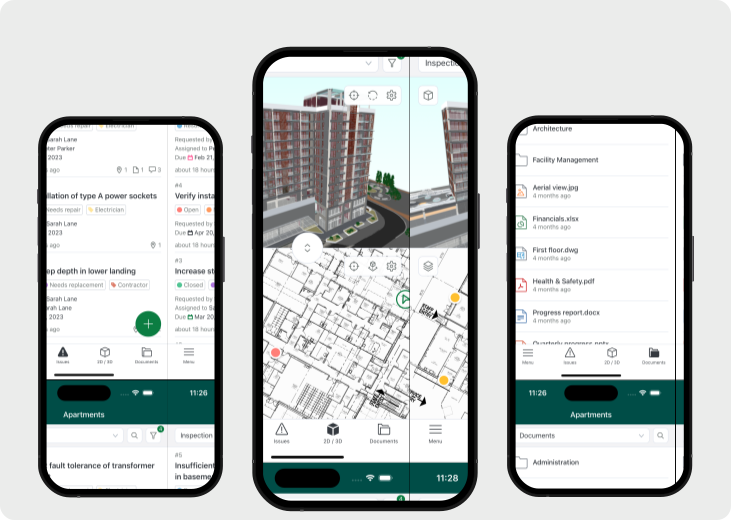
Catenda site quality and handover view showing mobile inspection checklists and snags pinned to the model across phones

You hold the programme, the budget and the risk.

The model lives with the architect, the structural revisions with the engineer, the snag list on a clipboard — and your subs mostly work off whatever landed in their inbox. Whatever platform you bring in, it has to be one they'll actually want to open. Something a foreman uses on his phone without a training day, something a QS opens without waiting on IT. Otherwise they drift back to email and you spend your evenings translating between everyone. That subs get in for free is a bonus for you — not why they'll stay.

When a slab level or duct route changes, everyone downstream needs to know. That's what Catenda handles.

The most expensive defect isn't the one you find. It's the one you can't prove you fixed.

Capture, verify, prove.

Site work isn’t one job, it’s every decision that gets made once a project is being built: quality, defect management, health and safety, with more use cases on the way. Catenda Site captures each one where the work happens, so it’s proven in real time instead of reconstructed under pressure.

Defect / issue management

  • Pin a defect to the exact spot on the drawing, add a photo, assign it.
  • It lands in the project record instantly, no camera roll, no siloed app.
  • Track it open to resolved, with the thread and fix photo on one pin.
  • Months later, the defect, fix and responsible trade stay on record.
In development

Quality management

  • Run the right check where you stand, mark each item pass or fail with a photo.
  • A failed item raises a located NCR that blocks the pour until it’s closed.
  • A QA gate holds the irreversible step until every prerequisite is signed off.
  • Coverage is provable in real time, export the record, don’t reconstruct it.
In development

Health & safety

  • Run toolbox talks, permits and inspections from your phone, signed off on-site.
  • Pin a hazard to the exact spot, add a photo, and assign it to the right party.
  • High-risk work stays blocked until the permit and prerequisites are signed off.
  • At audit, talks, permits and inspections are on record, located and exportable.

See what’s live today, and what’s coming next.

Get started

10×.

The paperwork does itself.

On site, the record that matters most is the one nobody has time to write down, it lives in a voice note, a WhatsApp thread, someone’s head. Catenda AI turns the site walk itself into the structured record: it drafts the checklist from your quality plan, reads what you say as you inspect, logs each pass or fail against the location, raises the fix, and writes the gap report.

The work you dreaded is done before you get to it. This is where we’re heading, shown here as a preview, not a shipped feature.

CAI CAPTUREAvailable soon

Voice → audit trail

A worker says “Third floor east wing, formwork C4–C8, all good except C6, ~15 mm off.” AI pulls the location, the check template and the pass/fail, creates the C6 issue, and suggests the trade to assign it to, in any language.

DYNAMIC QUALITY PLANAvailable soon

47 of 52 checks documented

AI reads your quality plan and schedule, maps each check to a location and phase, and matches evidence as it flows in. Friday’s report writes itself: “Missing: waterproofing inspection at zones B3–B5. Auto-create and assign?”

This job runs on Catenda Site.

Catenda Site is the field app your inspectors and subcontractors actually use on the floor. It sits on Catenda Hub, so the quality record you build during the job is the same record the handover pack comes from at the end.

Catenda Site

Runs this job

The mobile field app for site quality and handover. Run checklists, raise snags pinned to the model, capture photos offline, and assign items to subs through a magic link.

  • iOS + Android, works offline
  • Snags pinned to plan or IFC element
  • Magic-link access for subcontractors
Explore Catenda Site

Catenda Hub

Backs it

The CDE behind the field app. Every snag, photo and sign-off lands in the same source of truth as the models and documents, so the handover pack assembles from one record, not five.

  • One source of truth for the project
  • Snags linked to models + documents
  • Audit trail on every state change
  • Handover pack export
Explore Catenda Hub

Site Management FAQ.

Does the site app work offline?

Yes. Inspectors run checklists, raise snags and capture photos with no signal. Everything syncs to the project automatically when the device is back online, so a basement or a steel-framed core never costs you a record.

How do subcontractors close snags without a paid seat?

Each subcontractor gets a magic link to their assigned items, no account, no licence, no app install. They see their snags, mark them done and attach the fix photo, and status comes back to you in real time. Pricing is by project, so inviting every sub costs nothing extra.

Which acceptance protocols and standards are supported?

Checklists and snag categories map to the protocol on your contract: BOB and VOB in Germany, WKB in the Netherlands and ÖNORM in Austria, alongside your own templates. You inspect against the standard the client signs off to, so the record you build during the job is the record the protocol asks for at handover.

What does the handover pack actually contain?

The O&M pack, the as-built record, the certificates and the closed-snag log, compiled from what the team captured during the job and assembled against your protocol. Anything still open is flagged with the responsible sub before sign-off, and the client receives one structured, signed-off package.

Are snags linked to the model and documents?

Yes. A snag pins to a location on the plan or directly to an IFC element, and lives in the same source of truth as the models and documents in Catenda Hub. The quality record, the model and the handover pack are one connected trail, not five separate systems.

One record for everything on site.

See what’s possible on site.

Start with defects. That’s it.